

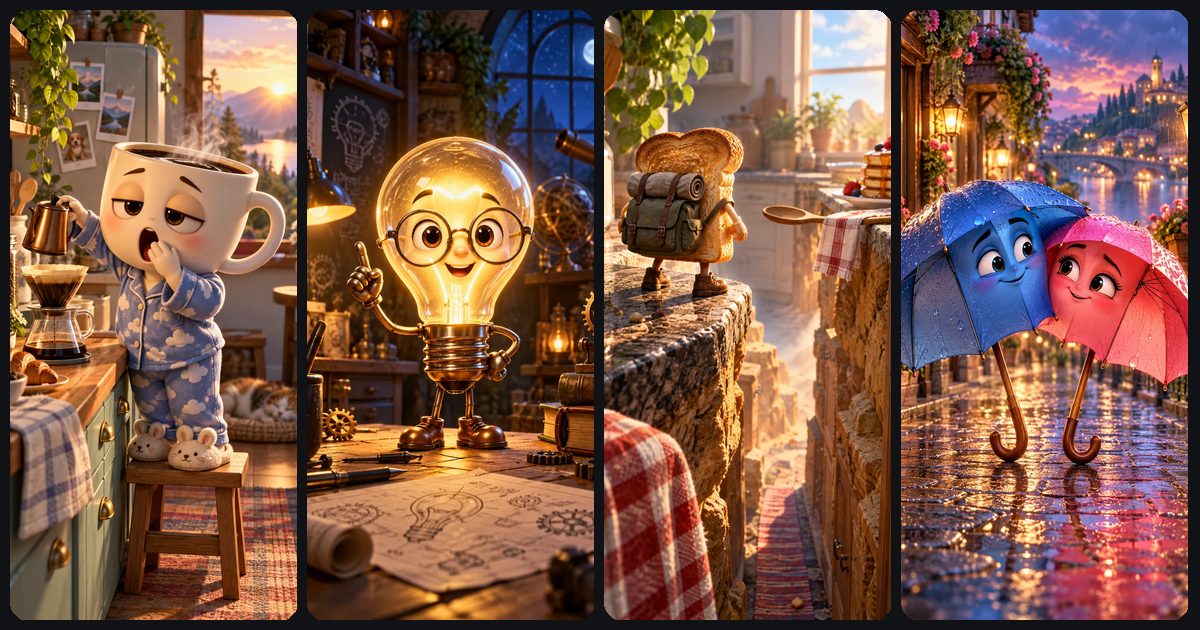
To make an AI talking object video, give an everyday object a face and a personality, write one short line that fits the clip length, and generate it with sound on so the object speaks for itself. The other route is to generate a silent clip and add a voiceover in an editor. Either way, a coffee mug complaining about Mondays is one 8-second clip and one prompt: 50 stars on ToonlyAI with Veo 3.1 Lite.
Below: 12 object ideas with opening lines, a script-length guide, a prompt template with full examples, and how to choose between native dialogue and a voiceover.
What a talking object video is and why it works
Talking objects are everyday things (a mug, a stapler, a toaster) with eyes, a mouth and an attitude, usually voicing a feeling the viewer already has. The joke lands instantly because the object explains itself: a phone charger at one percent needs no backstory.
The format also suits AI video for practical reasons. Cartoon objects avoid the uncanny look that synthetic humans can have, the shots are simple (one character, one location), and a single 8-second clip can be a complete post. The same character can work as a comedy series, an explainer host or a product mascot.
Want multi-character, serialized stories instead? That's a different format with its own structure, covered in how to make an AI fruit drama.

Pick the object and angle: 12 talking object ideas
The best objects come with a built-in complaint or a built-in job. Pick something your audience touches every day, give it one exaggerated trait, and let the first line state the problem.
| Object | Personality | Opening line | Good for |
|---|---|---|---|
| Coffee mug | Exhausted Monday philosopher | I have been awake since six. You have been awake for four minutes. | Relatable comedy |
| Houseplant | Passive-aggressive, overlooked | Oh, you remembered I exist. Love that for me. | Comedy series |
| Toaster | Dramatic perfectionist | Setting five? Do you want toast or charcoal? | Kitchen comedy |
| Kettle | Impatient gossip | Don't lift the lid. I'm almost there. Almost. | Short loops |
| Stapler | Jaded office veteran | Twelve years on this desk. Nobody has ever refilled me. | Workplace humor |
| Sticky note | Anxious reminder | Hi. Me again. The deadline is today. Please look at me. | Productivity tips |
| Phone charger | Clingy and overworked | One percent? You only ever call me at one percent. | Tech humor |
| Tooth (molar) | Friendly health explainer | Don't forget the back teeth. We live here too, you know. | Kids' education |
| Heart | Upbeat coach | Take the stairs today. I'll handle the rest. | Fitness content |
| Running shoe | Competitive motivator | Rain? Perfect. I was built for this. | Product ads |
| Water bottle | Persistent hydration nag | Still full. Since breakfast. Just saying. | Product ads, wellness |
| Lightbulb | Bright-idea host | Quick tip before you start: write the ending first. | Explainer series |
Angle matters as much as the object. Frame a close-up or medium close-up at the object's eye level so the face fills the vertical frame, and keep the object in its natural habitat: the mug on a counter, the stapler on a cluttered desk. Talking food works the same way, whether it's toast or a coffee cup. ToonlyAI's Talking objects story starters (Coffee needs coffee, The runaway sneaker, The brightest idea, Toast of the town and Under one umbrella) show this framing with ready-made prompts.
Write a script that fits 8–10 seconds
The most common mistake is writing too much. A line that doesn't fit the clip gets rushed, cut off or garbled. A useful rule of thumb is about 2.5 spoken words per second; then leave a beat for the object to react.
| Clip length | Maximum words | Comfortable target | Models on ToonlyAI |
|---|---|---|---|
| 4 s | ~10 | 5–8 words | Veo 3.1 Lite, Veo 3.1 Fast |
| 5 s | ~12 | 6–10 words | Kling 3.0 |
| 6 s | ~15 | 8–12 words | Veo 3.1 Lite, Veo 3.1 Fast |
| 8 s | ~20 | 12–16 words | Veo 3.1 Lite, Veo 3.1 Fast |
| 10 s | ~25 | 15–20 words | Kling 3.0 |
- One idea per clip: a complaint, a tip or a reveal, never all three.
- Front-load the hook. The first three or four words should make sense on their own.
- Write it the way it's spoken. Use 'one percent', not '1%', and skip brand names that are hard to pronounce.
- Leave a silent beat at the end for an eye-roll or a sound effect. It's often the funniest moment.
- Need more than 20 words? Split the script across two clips instead of cramming one.
Design the face: image first
Where the face goes decides whether the object still reads as itself. Put the eyes on the largest flat or gently curved surface with the mouth just below, keep the real material, color and proportions, then add one prop or costume detail that signals the personality.
- Mugs and cups: face on the side opposite the handle, which can double as an arm.
- Shoes: eyes on the toe box, laces as eyebrows or hair.
- Flat items (sticky notes, phones, books): face in the upper half, so captions never cover the mouth.
- Products with labels: keep the face clear of the label, since the model may warp printed text.
- Body parts for education: a friendly cartoon style rather than an anatomical one.
For the most control, make the character as a still image first, with ToonlyAI's image tools (10 stars per image) or by converting a photo of the real object to a cartoon. Then animate the still with Image to Video. Describe only the motion and the line, not the object or background again, so the design stays locked. The full process is in how to animate a photo with AI.
Object monologue prompts: template and examples
This template covers the elements Google lists in its Veo prompt guide: shot and camera, subject, action, setting, audio and style. Fill in the brackets and keep the dialogue unquoted.
[Shot size and one camera move]. A [object] character with [material, color, face details and one costume or prop] [does one clear action] in [setting]. The [object] says in a [age, energy and tone] voice: [line, no quotation marks]. [Sound effect or ambience, in its own sentence]. [Style], [lighting], vertical 9:16.
Two details matter more than they look. Never wrap the line in quotation marks: Google's current Veo guidance says quotes can produce on-screen text, so write The mug says: Good morning. And use one main camera move per shot, tied to the subject, which Kling's prompt guide also recommends.
Close-up with a slow push-in. A sleepy white ceramic coffee mug character with half-closed brown eyes, rosy cheeks and blue cloud-print pajamas leans against a coffee grinder on a cozy kitchen counter at sunrise. The mug yawns, then glares at the camera. The mug says in a slow, croaky, deadpan voice: I have been awake since six. You have been awake for four minutes. Ambient sound: a kettle starting to whistle and birds outside. Polished 3D animation, warm golden morning light, shallow depth of field, vertical 9:16.
Medium close-up, static camera. A droopy potted pothos plant character with big sad green eyes and a tiny frown sits on a sunny windowsill, one long leaf draped dramatically over its pot. The plant slowly lifts its head toward the camera. The plant says in a dry, sarcastic, theatrical voice: Oh, you remembered I exist. Love that for me. Sound effect: a single water droplet. Claymation style, soft daylight, vertical 9:16.
Medium shot with a gentle tilt up. A friendly cartoon molar character with shiny white enamel, round blue eyes and a tiny toothbrush held like a sword stands on a soft pink cartoon gum landscape. The molar points the toothbrush toward a row of back teeth. The molar says in a cheerful, upbeat, kid-friendly voice: Don't forget the back teeth. We live here too, you know. Sound effect: a sparkly brushing swish. Bright, colorful 3D animation, soft even lighting, vertical 9:16.
Medium close-up with a slow push-in. A plain, unbranded bright red running shoe character with white laces, a white sole and determined green eyes on the toe box jogs in place on a wet city sidewalk at dawn, raindrops bouncing off it. The shoe stops, looks straight at the camera and grins. The shoe says in a confident, energetic, coach-like voice: Rain? Perfect. I was built for this. Five kilometers. Let's go. Sound effects: rain splashing and quick footsteps. Polished cinematic 3D animation, cool blue light with warm streetlights, vertical 9:16.
Close-up, static camera. A dented silver office stapler character with tired grey eyes and tiny reading glasses sits on a cluttered desk beside a cold cup of coffee under flickering office lights. The stapler keeps its mouth closed, sighs with its whole body, slowly turns to look at an empty staple box, then looks back at the camera with a long, unimpressed stare. Muted office colors, polished 3D animation, vertical 9:16.
The stapler clip is built for a voiceover: record 'Twelve years on this desk. Nobody has ever refilled me.' in an editor and lay it over the stare. For more camera moves and styles, see AI video prompts.
Open ToonlyAI's Text to Video, paste the coffee mug example, choose Veo 3.1 Lite at 9:16 with sound on, and check the star cost before you generate. Clips usually take one to three minutes.
Open the video studioOne-pass audio vs voiceover: which to use
There are two ways to give an object a voice, and neither needs a separate lip-sync tool.
- One pass (native dialogue): turn sound on and write the line into the prompt. The model generates the voice and the mouth movement together.
- Two pass (silent clip plus voiceover): generate the clip with sound off, then record narration or the object's inner voice in a video editor. The mouth won't match your audio, so prompt the object to keep its mouth closed and act with its eyes, posture and timing.
| Factor | One pass (sound on) | Two pass (silent + voiceover) |
|---|---|---|
| Cost, 8 s on Veo 3.1 Lite | 50 stars | 30 stars, plus your recording time |
| Exact wording | Usually close; occasional slurred or swapped words | Exactly what you record |
| Mouth movement | Generated with the speech | None; the object reacts silently |
| Voice across episodes | Can vary between clips | Identical every time |
| Best for | One-liners, two objects bantering | Explainers, product ads, longer scripts, a signature series voice |
Native speech isn't perfect yet. Google's own Veo page notes that natural speech, especially short speech, is still in active development, so budget for a re-roll on dialogue clips. If a line keeps coming out wrong, shorten it, simplify the words or switch that clip to two-pass. Use your own voice, or a voice you have the rights to use. Dialogue syntax and audio fixes are covered in depth in AI video with sound.
Talking product ads: what to do and what to avoid
A talking product is one of the cheapest ad formats to test, because each hook variant is a single clip: three 8-second variations on Veo 3.1 Lite with sound cost 150 stars.
- Use your own product only. Leave out competitor products, logos and brand names, and don't have your object mock a rival by name.
- Add the logo and price in the editor. AI video can warp small text and labels, so overlay your real logo, packshot or price after generating.
- Start from a real product photo for accurate shape and color: cartoonify it, then animate it with Image to Video.
- Keep claims honest. The object can be playful, but what it says about the product should be true.
- Test hooks, not whole ads. Change only the opening line between variants so you know what made the difference.
Edit, caption and post
- Download the MP4 and trim any dead frames at the start.
- Add captions that match the line word for word, kept near the middle of the frame and away from the bottom and right edges where app buttons sit.
- Layer the voiceover for two-pass clips, plus quiet ambience or music so the clip doesn't feel empty.
- Add an end beat: a reaction, a loop back to the first frame, or an on-screen question for comments.
- Post the same character on a schedule. The same mug every Monday builds a series; a new object every day is harder to remember.
Platform specs and hook formulas are in how to make AI videos for TikTok, Reels and Shorts. On labels, YouTube says clearly unrealistic or animated content doesn't need its altered or synthetic content disclosure, and neither does a voiceover made by cloning your own voice. If you plan to earn from the series, read can you monetize AI videos on YouTube first: templated, mass-produced uploads are where AI channels run into trouble.
Pick one of the 12 ideas, design the face as an image, and generate a single 8-second clip. Pay-as-you-go stars, no subscription, and failed generations are refunded automatically.
See talking object starters